Don't miss our spring offer - up to 40% OFF!

How to Choose the Right Refurbished Laptop
Learn how to choose a refurbished laptop with practical advice on condition, testing, performance, refurbishment and warranty.

Buying a refurbished laptop can be one of the best ways to get a capable business computer without paying the price of a new machine. But choosing the right one isn’t simply about finding the cheapest laptop or the one with the newest-looking design.
The most important question is: What do you actually need the laptop to do?
A slim laptop may look impressive, but that doesn’t automatically make it the right choice. Someone who travels every day may prioritise portability, while someone working with spreadsheets may benefit more from a full-size keyboard with a numeric keypad.
And when buying refurbished, there’s another important question: How do you know the laptop has actually been checked properly?
1. Start With What You Need the Laptop For
This is the first question we ask customers: “What are you going to use the laptop for?”
It sounds simple, but it can completely change which laptop is the right choice.
For example, a person who travels frequently may want something compact and portable. Someone working with accounting or spreadsheets may prefer a laptop with a dedicated numeric keypad.
Someone who needs more processing power may be better served by a slightly larger business laptop rather than choosing the thinnest model available.
Don’t choose a laptop with your eyes alone
One of the biggest mistakes buyers make is assuming: Slimmer = better.
It doesn’t. The right laptop depends on the job it needs to do.
- What software will you use?
- Will you travel with the laptop?
- Do you need a numeric keypad?
- Will you connect external monitors?
- How much storage do you need?
- Do you need more performance for demanding applications?
- Is portability more important than performance?
If you’re buying a laptop for school or work, ask the school, employer or organisation for the required specifications first. Those requirements help you choose a machine that actually fits the job instead of simply choosing the laptop with the biggest numbers.
2. Inspect the Physical Condition First
If you’re buying a refurbished or pre-owned laptop in person, don’t switch it on immediately. Look at it first.
When assessing a batch of laptops, the first thing we look at is the overall physical condition. Check the screen for cracks or damage, inspect the ports, look for dents and examine the general appearance of the device.
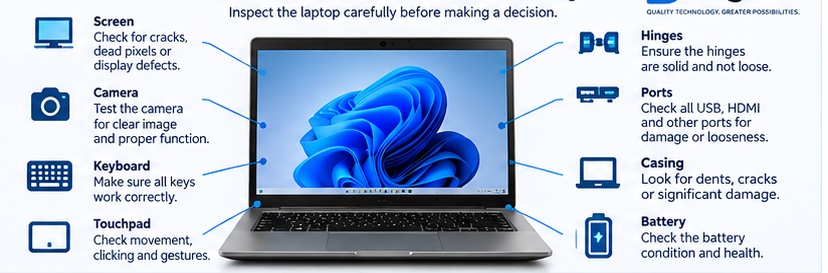
- Screen: Look for cracks, broken glass and obvious display damage.
- Ports: Check that USB and other connectors are physically intact.
- Body: Look for dents, cracks, deep scratches and broken sections.
- Overall appearance: Consider whether the device can be made presentable for resale.
A laptop can have excellent specifications and still not be a good refurbishment candidate if the physical condition is too poor. Performance isn’t the only consideration. The finished laptop also needs to be presentable.
3. Test the Laptop — Don’t Just Switch It On
A laptop starting up does not mean everything works.
If dedicated testing software is available, it can be used to systematically check the laptop. If it isn’t, many checks can be performed manually in Windows using free utilities.
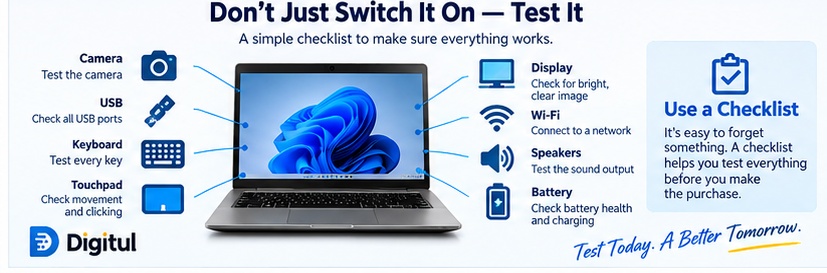
| What to test | What you’re checking |
|---|---|
| Keyboard | Individual keys work correctly |
| Touchpad | Movement and clicking |
| Camera | Camera operates correctly |
| USB ports | Devices connect correctly |
| Other ports | Required connections function |
| Battery | Actual battery condition |
| Speakers | Sound output works |
| Wi-Fi | Wireless connectivity |
| Display | Screen operates correctly |
For keyboard testing, a dedicated keyboard utility can help you check individual keys so you don’t miss a faulty one. Battery information software can also provide a better indication of battery health than simply seeing whether the laptop runs on battery power.
4. Test Wi-Fi, Sound and Other Everyday Functions
Some checks don’t require complicated equipment. Once connected to the internet, YouTube can be useful for checking multiple things at once. Playing a video allows you to confirm internet connectivity, Wi-Fi, speakers and audio output while also checking general video playback.
This is where having a checklist becomes particularly valuable. You may test the keyboard, see that Windows starts and decide everything is fine — only to discover later that a USB port or the camera doesn’t work.
5. Don’t Stop at Basic Testing — Stress-Test the Laptop
A laptop can pass basic tests and still have a problem that only appears when the hardware is placed under heavy load. That’s why stress and benchmark testing are useful.
At Digitul, FurMark is used as part of the stress/benchmark testing process to push the hardware and identify problems that may not appear during ordinary use.

- Does it overheat?
- Does it unexpectedly switch off?
- Does it remain stable under sustained load?
- Does the hardware continue operating properly?
If a laptop overheats or shuts down during testing, the cause needs to be investigated. Thermal paste may be replaced and the laptop tested again. If it continues to fail after appropriate basic repairs, that can indicate a more serious hardware problem.
6. Decide Whether the Laptop Is Worth Refurbishing
Not every used laptop is worth putting back on the market. After testing, you can identify what needs attention and decide whether the work is practical.
- Battery needs replacing → replace the battery.
- Keyboard has faulty keys → replace the keyboard.
- RAM needs upgrading → upgrade the RAM.
- Storage needs upgrading → replace or upgrade the drive.
The decision changes when there are multiple problems or a major hardware fault. If a laptop requires extensive work and still fails important testing, the cost and effort involved may no longer make sense.
7. Refurbishment Isn’t Just About Making It Work
Once a laptop has passed testing and is considered worth refurbishing, the next stage is preparing it properly.
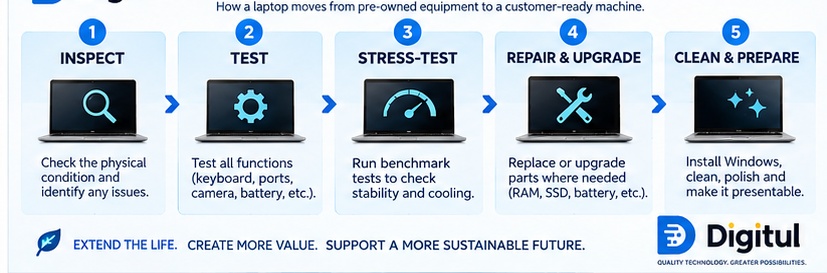
- Replacing or upgrading RAM
- Replacing or upgrading the storage drive
- Replacing the keyboard
- Replacing the battery
- Installing Windows
- Removing old stickers and labels
- Cleaning the laptop
- Polishing the exterior
- Making sure the finished laptop is presentable
The goal is not simply to make the laptop switch on. The finished device should be functional, properly prepared and presentable.
8. Refurbished vs Pre-Owned: What’s the Difference?
A pre-owned or used laptop is a laptop that has had a previous owner. It may have cosmetic marks such as scratches or dents. That doesn’t necessarily mean there is anything wrong with the laptop.
If the laptop has been properly tested and works correctly, cosmetic wear can provide an opportunity to save money. You may get the performance you need for less money while accepting some cosmetic imperfections.
A refurbished laptop has gone through additional preparation, which may include testing, repairs, component replacement or upgrades, cleaning and software installation. The exact refurbishment process can vary between sellers, so ask what was actually done to the laptop.
9. Ask the Seller What Was Actually Tested
Before buying, don’t be afraid to ask questions.
- Has the keyboard been tested?
- Have all the USB and other ports been tested?
- Has the camera been tested?
- Has the battery been checked?
- Has the laptop been stress-tested?
- Has anything been replaced or upgraded?
- What Windows version is installed?
- What warranty is included?
You don’t necessarily need to perform every test yourself if you’re buying from a reputable refurbisher who can explain what was checked. But you should understand what you’re paying for.
10. Always Check the Warranty
Warranty is another important consideration when comparing refurbished and pre-owned equipment. A warranty gives you additional protection if a problem develops after purchase, but you should always read the actual warranty terms to understand what’s covered.
Pre-owned / used
For used or pre-owned equipment, three months can be a reasonable warranty period. These machines may have cosmetic imperfections such as scratches or dents while still functioning properly.
Refurbished
For a more extensively refurbished machine, six months or more is a reasonable standard to look for. The important thing is not just the number of months. Ask what the warranty covers, what happens if the laptop develops a fault, where it must be returned, and what exclusions apply.
The Refurbished Laptop Checklist
Save this checklist and use it before you make your decision.
- Your requirements: Know what you’ll use the laptop for; get the required specifications for school or work; decide whether portability or performance matters more; check whether you need a numeric keypad.
- Physical inspection: Check the screen, casing, hinges, ports, keyboard and touchpad.
- Functional testing: Test every keyboard key, touchpad, camera, USB ports, other required ports, Wi-Fi, speakers, battery condition and display.
- Performance: Run appropriate diagnostic tests, stress-test the laptop and check for overheating or unexpected shutdowns.
- Before paying: Ask what was repaired or replaced, confirm RAM and storage, confirm the Windows installation, check the warranty and understand the cosmetic condition.
So, What Is the Best Refurbished Laptop?
There isn’t one answer.
The best refurbished laptop is the one that matches your requirements, has been properly tested, is in an acceptable physical condition and comes from a seller who can explain what has been done to it.
Don’t automatically choose the thinnest laptop. Don’t automatically choose the newest processor. And don’t automatically choose the cheapest machine.
Start with what you need the laptop to do. Then look at the specifications, condition, testing, refurbishment work and warranty.
That’s how you choose a refurbished laptop based on value rather than appearance alone.
Looking for a Refurbished Laptop?
If you’re unsure which laptop is right for your work, studies or everyday use, start by telling us what you need the laptop for and the specifications you’ve been given.
We can help you find a machine that matches your requirements rather than simply selling you the laptop with the biggest numbers.
Browse our refurbished laptops →
Looking for laptops for your business or team? → Bulk Laptop Solutions
Frequently Asked Questions
Are refurbished laptops worth buying?
They can be, provided the laptop has been properly evaluated and the specification matches your needs. The key is to look beyond the price and ask about condition, testing, battery health and warranty.
What should I check when buying a refurbished laptop?
Start with the physical condition, then check the keyboard, touchpad, camera, ports, battery, Wi-Fi, sound and display. If possible, the laptop should also undergo appropriate diagnostic and stress testing.
Is a pre-owned laptop the same as a refurbished laptop?
Not necessarily. Pre-owned describes a laptop that has previously been owned. Refurbishment refers to additional work performed to prepare a device for resale. The exact process can vary by seller.
Should I choose the thinnest refurbished laptop?
Not necessarily. A thin laptop may be ideal for someone who travels frequently, but someone who needs more performance or a numeric keypad may be better served by a different design.
How important is battery health?
Very important. A laptop can function normally while having a battery with significantly reduced capacity, so battery condition should be tested rather than assumed.
How long should the warranty be on a refurbished laptop?
Warranty periods vary by seller and product. As a practical benchmark from our experience, we recommend looking for around three months on used/pre-owned equipment and at least six months on refurbished equipment, while checking exactly what the warranty covers.